Showing posts with label Mobile Tips and Tricks. Show all posts

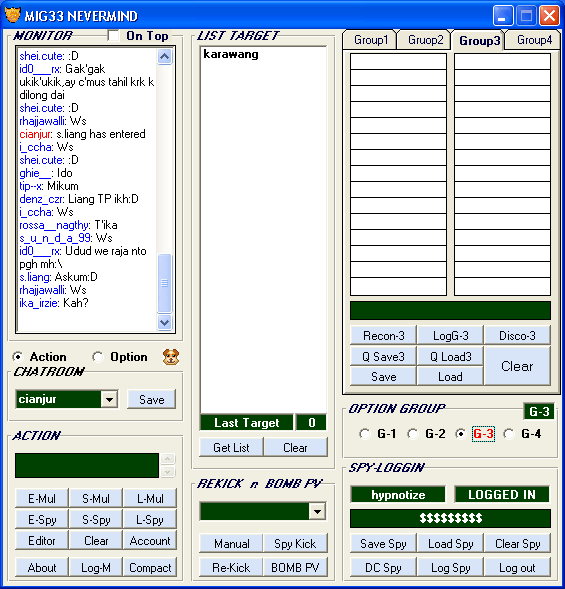
Mig33 chat tools V3 [Pv/Boom,ChatRoom,Kicker,Flooder,Acount]

April 30, 2010 All in One Blog

* Support 17×17 Multy
* IDR Checker & Transfers
* Kick Some Nick
By all Muty Selected
* Set ‘Clik As Kick’
(Click In the list)
* Auto Left (For All Multy/Nick)
/—————————————-
* Send Text Messages For Room
By all Muty Selected
* Send Text Messages For Nick
(PV) By all Muty Selected
* Send Text E-Mail To Some Nick
By all Muty Selected
* Send Add Request To Some Nick
By all Muty Selected
* Auto Flood Room
* Boom Nick (With Boom Add,
Mail,Private And GC)

/—————————————-
* Clone Text Users in the room
* Clone Text Users in the
room & Mirror By Char
* Clone Text Users in the
room & Mirror By Text
* Option For Sending Messages To
Room (Active Nick Only)
- Normal
- Mirror By Text Mode
- Mirror By Char Mode
- Upchar (Up 1 Digits) Mode
/—————————————-
* Option Set ‘Chat Nick’ For Set
Nick as Normally Chat
* Private Chat/PV Tab (Max:39 tab)
* Admin list (Maybe You need a help)
* GC Tab Chat (Max: 7)
* “Kick When Entered” Is A Options
For Block Multy/Flooder in the Room
Ex : If Multy Is ‘flooder-01′,
‘flooder-02′…’flooder-x’,
Insert/Set initail multy
is : flooder- (Auto kick
When ‘flooder-0′ until
‘flooder-x’ is entered)
/—————————————-
Update :
* Inserting Boom Picture In The “Boom
Nick” Fedatured.
* Multy Creators.
Download :
»»  Read more

4 in 1 Mig33 v4.2 mobile multi

All in One Blog

Mig33 mobile multi kick soft


 *4 id login
*Mig33 v4.20
*u can use emoticon

»»  Read more

Somw secret iPhone codes

March 31, 2010 All in One Blog


*3001#12345#* and tap Call. Enter Field Mode.
*#06# Displays your IMEI. No need to tap Call.
*777# and tap Call. Account balance for prepaid iPhone.
*225# and tap Call. Bill Balance. (Postpaid only)
*646# and tap Call. Check minutes. (Postpaid only)
*#21# and tap Call. Setting interrogation for call forwards.
*#30# and tap Call. Calling line presentation check.
*#76# and tap Call. Check whether the connected line presentation is enabled or not.
*#43# and tap Call. Determine if call waiting is enabled.
*#61# and tap Call. Check the number for unanswered calls.
*#62# and tap Call. Check the number for call forwarding if no service is available.
*#67# and tap Call. Check the number for call forwarding when the iPhone is busy.
*#33# and tap Call. Check for call control bars.
»»  Read more

Free Download Smart movie v4.15 for S60v1, 2 and 3 with pc converter

March 15, 2010 All in One Blog

Smartmovie v4.15 for S60v1, 2 and 3 with pc converter (including keygen)

Lonely Cat Games Smartmovie v4.15 for symbian s60v1, s60v2, and s60v3

Play your videos on your mobile device,
anywhere, anytime, you need just a few steps

* Convert any video file on your PC into a phone-friendly video file with subtitles of origional file
* Upload video into device/memory card
* Play the video in SmartMovie Player installed on your mobile device

Features…
* Preview all the video files, placed anywhere in your mobile, in the starting window

* Automatically searches for video files and previews them to start with.

* Standard AVI format, allowing you to preview converted files on your PC

* Also plays MP4V, FLV and 3GP file formats

* Player uses the phone screen in portrait or landscape mode, utilizing the full screen size of the device

* Rescaling of video to utilize the full screen area

* Support for subtitles – allowing you to watch movies in different languages

* Friendly PC converter – preview videos on PC, select parts you want to convert, change conversion quality

* Converter supports DirectShow codecs, so you may use video codecs downloadable from the internet

* Fast conversion; on a standard PC conversion is 5x faster than the video clip playback time.
You\’ll convert entire movie in just a few minutes

* Quality rescale algorithm in player, delivering best possible picture quality

* Customizable video player (brightness, language, volume, and more)

* User-friendly interface – watch movies, don\’t waste time configuring obscure settings

New in version 4.15- starting from 4.00 to 4.15
4.00 (Dec 15 2008) New look, using system themes (on Symbian), thumbnails in file browser, support for mp4 and 3gp file format
4.01 (Jan 03 2009) FLV file format (flash video)
4.10 (Mar 16 2009) Improved support for S60 touch screen phones, fixed M4V playback on S60 phones
4.15 (May 30 2009) Selectable video folders, Chinese+Japanese coding for subtitles

Some useful info about symbian S60 version number, OS number and related phones phones…

S60 1st Edition v1.2 OS6.1

* Nokia 3600
* Nokia 3620
* Nokia 3650
* Nokia 3660
* Nokia N-Gage
* Nokia N-Gage QD
* Sendo X
* Sendo X2
* Siemens SX1

S60 2nd Edition v2.0 OS7.0s

* Nokia 6600
* Panasonic X700
* Panasonic X800
* Samsung SGH-D720
* Samsung SGH-D728
* Samsung SGH-D730
* Samsung SGH-Z600

S60 2nd Edition,
Feature Pack 1 V2.1 OS7.0s

* Nokia 3230
* Nokia 6260
* Nokia 6620
* Nokia 6670
* Nokia 7610

S60 2nd Edition, Feature Pack 2 V2.6 OS8.0a

* Lenovo P930
* Nokia 6630
* Nokia 6680
* Nokia 6681
* Nokia 6682

S60 2nd Edition,
Feature Pack 3 v2.8 OS8.1a

* Nokia N70
* Nokia N72
* Nokia N90

S60 3rd Edition v3.0 OS9.1

* Nokia 3250
* Nokia 5500 Sport
* Nokia E50
* Nokia E60
* Nokia E61
* Nokia E61i
* Nokia E62
* Nokia E65
* Nokia E70
* Nokia N71
* Nokia N73
* Nokia N75
* Nokia N77
* Nokia N80
* Nokia N91
* Nokia N91 8GB
* Nokia N92
* Nokia N93
* Nokia N93i
* Samsung SGH-i570

S60 3rd Edition,
Feature Pack 1 v3.1 OS9.2

* LG KS10
* LG KT610
* LG KT615
* Nokia 5700 XpressMusic
* Nokia 6110 Navigator
* Nokia 6120 classic
* Nokia 6121 classic
* Nokia 6124 classic
* Nokia 6290
* Nokia E51
* Nokia E63
* Nokia E66
* Nokia E71
* Nokia E90 Communicator
* Nokia N76
* Nokia N81
* Nokia N81 8GB
* Nokia N82
* Nokia N95
* Nokia N95 8GB
* Samsung SGH-G810
* Samsung SGH-i400
* Samsung SGH-i408
* Samsung SGH-i450
* Samsung SGH-i458
* Samsung SGH-i520
* Samsung SGH-i550
* Samsung SGH-i550w
* Samsung SGH-i560
* Samsung SGH-i568

S60 3rd Edition,
Feature Pack 2 v3.2 OS9.3

* Nokia 5320 XpressMusic
* Nokia 5630 XpressMusic
* Nokia 5730 XpressMusic
* Nokia 6210 Navigator
* Nokia 6220 classic
* Nokia 6650 fold
* Nokia 6710 Navigator
* Nokia 6720 classic
* Nokia 6730 classic
* Nokia E52
* Nokia E55
* Nokia E71x
* Nokia E75
* Nokia N78
* Nokia N79
* Nokia N85
* Nokia N86 8MP
* Nokia N96
* Samsung GT-i8510 (INNOV8)
* Samsung GT-I7110
* Samsung SGH-L870

S60 5th Edition v5.0 OS9.4

* Nokia 5800 XpressMusic
* Nokia N97
* Samsung i8910 Omnia HD
* Sony Ericsson Satio

Download

Password : idoneo 198
»»  Read more

Free Sony Ericsson GamesT610 + T630

March 04, 2010 All in One Blog

Simply download and unpack the games (you may need winzip)

Then use your cable or Bluetooth Dongle or infra-red cable and preferred software to send them to your phone.


»»  Read more

How To Transfer Games To Your 3650, 3660, 7650

All in One Blog

SIS Installation instructions

Firstly you will need an infra red connection cable. Download the SIS file to your computer. Enable infrared port in your phone. Select your sis file on PC, press right mouse button and select "Send to -> Infrared". The file will arrive as new message. Open Messaging application, then open the message. Installer will be started automatically.


Java Installation instructions

Download one of the Free Nokia java Game files and unzip the contents to a folder called 'Games' on your desktop. You may need winzip to do this.


Now


Step 1. Download and install PC Suite 56MB

Step 2. Connect your Nokia to your computer with a cable or Bluetooth Dongle or infra-red cable

Step 3. Launch the Application Installer and and continue reading this illustrated tutorial


Source : mobileplayground

»»  Read more

How To Transfer Games To Your 6600

All in One Blog

You will need a Bluetooth dongle.

To send a game to your mobile via Bluetooth. You simply right click the desired theme on your desktop, select Send To/Bluetooth/Nokia 6600

A new message will arrive on your phone, open it and you will be able to install the new game. Once installed, delete the message and press the menu button and your game will have been added.


Source : mobileplayground

»»  Read more

Nokia Mobile Secret Codes

February 22, 2010 All in One Blog

Hello !! To day i post some Nokia Secret Codes . it's very use full for nokia mobile .


Nokia Secret Codes
  • *#06# : for checking the IMEI (International Mobile Equipment Identity).
  • *#7780# : reset to factory settings.
  • *#67705646# : This will clear the LCD display(operator logo).
  • *#0000# : To view software version.
  • *#2820# : Bluetooth device address.
  • *#746025625# : Sim clock allowed status.
  • *#62209526# : Display the MAC address of the WLAN adapter.
  • #pw+1234567890+1# : Shows if sim have restrictions.
  • *#92702689# : takes you to a secret menu .
  • *#3370# - Enhanced Full Rate Codec .
  • *#3370* - (EFR) deactivation.
  • *#4720# - Half Rate Codec activation.
  • *#4720* - Half Rate Codec deactivation. The phone will automatically restart
»»  Read more

Samsung Secret Codes

All in One Blog

Hello !! Today I got some Samsung Secret Codes . it's very use full for Samsung mobile .


  • Software version: *#9999#
  • IMEI number: *#06#
  • Serial number: *#0001#
  • Battery status- Memory capacity : *#9998*246#
  • Debug screen: *#9998*324# - *#8999*324#
  • LCD kontrast: *#9998*523#
  • Vibration test: *#9998*842# - *#8999*842#
  • Alarm beeper - Ringtone test : *#9998*289# - *#8999*289#
  • Smiley: *#9125#
  • Software version: *#0837#
  • Display contrast: *#0523# - *#8999*523#
  • Battery info: *#0228# or *#8999*228#
  • Display storage capacity: *#8999*636#
  • Display SIM card information: *#8999*778#
  • Show date and alarm clock: *#8999*782#
  • The display during warning: *#8999*786#
  • Samsung hardware version: *#8999*837#
  • Show network information: *#8999*638#
  • Display received channel number and received intensity: *#8999*9266#
  • *#1111# S/W Version
  • *#1234# Firmware Version
  • *#2222# H/W Version
  • *#8999*8376263# All Versions Together
  • *#8999*8378# Test Menu
  • *#4777*8665# GPSR Tool
  • *#8999*523# LCD Brightness
  • *#8999*377# Error LOG Menu
  • *#8999*327# EEP Menu
  • *#8999*667# Debug Mode
  • *#92782# PhoneModel (Wap)
  • #*5737425# JAVA Mode
  • *#2255# Call List
  • *#232337# Bluetooth MAC Adress
  • *#5282837# Java Version
  • Type in *#0000# on a Samsung A300 to reset the language
  • Master reset(unlock) #*7337# (for the new samsungs E700 x600 but not E710)
  • Samsung E700 type *#2255# to show secret call log (not tested)
  • Samsung A300, A800 phone unlock enter this *2767*637#
  • Samsung V200, S100, S300 phone unlock : *2767*782257378#
  • #*4773# Incremental Redundancy
  • #*7785# Reset wakeup & RTK timer cariables/variables
  • #*7200# Tone Generator Mute
  • #*3888# BLUETOOTH Test mode
  • #*7828# Task screen
  • #*#8377466# S/W Version & H/W Version
  • #*2562# Restarts Phone
  • #*2565# No Blocking? General Defense.
  • #*3353# General Defense, Code Erased.
  • #*3837# Phone Hangs on White screen.
  • #*3849# Restarts Phone
  • #*7337# Restarts Phone (Resets Wap Settings)
  • #*2886# AutoAnswer ON/OFF
  • #*7288# GPRS Detached/Attached
  • #*7287# GPRS Attached
  • #*7666# White Screen
  • #*7693# Sleep Deactivate/Activate
  • #*2286# Databattery
  • #*2527# GPRS switching set to (Class 4, 8, 9, 10)
  • #*2679# Copycat feature Activa/Deactivate
  • #*3940# External looptest 9600 bps
  • #*4263# Handsfree mode Activate/Deactivate
  • #*2558# Time ON
  • #*3941# External looptest 115200 bps
  • #*5176# L1 Sleep
  • #*7462# SIM Phase
  • #*7983# Voltage/Freq
  • #*7986# Voltage
  • #*8466# Old Time
  • #*2255# Call Failed
  • #*5376# DELETE ALL SMS!!!!
  • #*6837# Official Software Version: (0003000016000702)
  • #*2337# Permanent Registration Beep
  • #*2474# Charging Duration
  • #*2834# Audio Path (Handsfree)
  • #*3270# DCS Support Activate/Deactivate
  • #*3282# Data Activate/Deactivate
  • #*3476# EGSM Activate/Deactivate
  • #*3676# FORMAT FLASH VOLUME!!!
  • #*4760# GSM Activate/Deactivate
  • #*4864# White Screen
  • #*7326# Accessory
  • #*7683# Sleep variable
  • #*3797# Blinks 3D030300 in RED
  • #*7372# Resetting the time to DPB variables
  • #*3273# EGPRS multislot (Class 4, 8, 9, 10)
  • #*7722# RLC bitmap compression Activate/Deactivate
  • #*2351# Blinks 1347E201 in RED
  • #*2775# Switch to 2 inner speaker
  • #*7878# FirstStartup (0=NO, 1=YES)
  • #*3838# Blinks 3D030300 in RED
  • #*2077# GPRS Switch
  • #*2027# GPRS Switch
  • #*0227# GPRS Switch
  • #*0277# GPRS Switch
  • #*22671# AMR REC START
  • #*22672# Stop AMR REC (File name: /a/multimedia/sounds/voice list/ENGMODE.amr)
  • #*22673# Pause REC
  • #*22674# Resume REC
  • #*22675# AMR Playback
  • #*22676# AMR Stop Play
  • #*22677# Pause Play
  • #*22678# Resume Play
  • #*77261# PCM Rec Req
  • #*77262# Stop PCM Rec
  • #*77263# PCM Playback
  • #*77264# PCM Stop Play
  • #*22679# AMR Get Time
  • *#8999*364# Watchdog ON/OFF
  • *#8999*427# WATCHDOG signal route setup
  • *2767*3855# = Full Reset (Caution every stored data will be deleted.)
  • *2767*2878# = Custom Reset
  • *2767*927# = Wap Reset
  • *2767*226372# = Camera Reset (deletes photos)
  • *2767*688# Reset Mobile TV
  • #7263867# = RAM Dump (On or Off)
  • *2767*49927# = Germany WAP Settings
  • *2767*44927# = UK WAP Settings
  • *2767*31927# = Netherlands WAP Settings
  • *2767*420927# = Czech WAP Settings
  • *2767*43927# = Austria WAP Settings
  • *2767*39927# = Italy WAP Settings
  • *2767*33927# = France WAP Settings
  • *2767*351927# = Portugal WAP Settings
  • *2767*34927# = Spain WAP Settings
  • *2767*46927# = Sweden WAP Settings
  • *2767*380927# = Ukraine WAP Settings
  • *2767*7927# = Russia WAP Settings
  • *2767*30927# = GREECE WAP Settings
  • *2767*73738927# = WAP Settings Reset
  • *2767*49667# = Germany MMS Settings
  • *2767*44667# = UK MMS Settings
  • *2767*31667# = Netherlands MMS Settings
  • *2767*420667# = Czech MMS Settings
  • *2767*43667# = Austria MMS Settings
  • *2767*39667# = Italy MMS Settings
  • *2767*33667# = France MMS Settings
  • *2767*351667# = Portugal MMS Settings
  • *2767*34667# = Spain MMS Settings
  • *2767*46667# = Sweden MMS Settings
  • *2767*380667# = Ukraine MMS Settings
  • *2767*7667#. = Russia MMS Settings
  • *2767*30667# = GREECE MMS Settings
  • *#7465625# = Check the phone lock status
  • *7465625*638*Code# = Enables Network lock
  • #7465625*638*Code# = Disables Network lock
  • *7465625*782*Code# = Enables Subset lock
  • #7465625*782*Code# = Disables Subset lock
  • *7465625*77*Code# = Enables SP lock
  • #7465625*77*Code# = Disables SP lock
  • *7465625*27*Code# = Enables CP lock
  • #7465625*27*Code# = Disables CP lock
  • *7465625*746*Code# = Enables SIM lock
  • #7465625*746*Code# = Disables SIM lock
  • *7465625*228# = Activa lock ON
  • #7465625*228# = Activa lock OFF
  • *7465625*28638# = Auto Network lock ON
  • #7465625*28638# = Auto Network lock OFF
  • *7465625*28782# = Auto subset lock ON
  • #7465625*28782# = Auto subset lock OFF
  • *7465625*2877# = Auto SP lock ON
  • #7465625*2877# = Auto SP lock OFF
  • *7465625*2827# = Auto CP lock ON
  • #7465625*2827# = Auto CP lock OFF
  • *7465625*28746# = Auto SIM lock ON
  • #7465625*28746# = Auto SIM lock OFF
»»  Read more

All China Mobile Secret Codes

All in One Blog

Hello ! today i'm post some China Mobile Secret Codes . this is very usefuul codes for China Mobile .


  • Engineer mode : *#110*01#
  • Factory mode : *#987#
  • Enable COM port : *#110*01# -> Device -> Set UART -> PS Config -> UART1/115200
  • Restore factory settings : *#987*99#
  • LCD contrast : *#369#
  • Software version : *#800#
  • Software version : *#900#
  • Set default language : *#0000# Send
  • Set English language : *#0044# Send
  • Set English language (new firmware) : *#001# Send
  • *#8375# Show Software Version CONFIRMED
  • *#1234# A2DP ACP Mode CONFIRMED
  • *#1234# A2DP INT Mode CONFIRMED
  • *#0000# + Send : Set Default Language CONFIRMED
  • *#0007# + Send : Set Language to Russian CONFIRMED
  • *#0033# + Send : Set Language to French CONFIRMED
  • *#0034# + Send : Set Language to Spanish CONFIRMED
  • *#0039# + Send : Set Language to Italian CONFIRMED
  • *#0044# + Send : Set Language to English CONFIRMED
  • *#0049# + Send : Set Language to German CONFIRMED
  • *#0066# + Send : Set Language to Thai CONFIRMED
  • *#0084# + Send : Set Language to Vietnamese CONFIRMED
  • *#0966# + Send : Set Language to Arabic CONFIRMED
»»  Read more

Digital Blog ( ডিজিটাল ব্লগ )

Digital Blog on Facebook
Button BEGIN --> Bookmark and Share