Showing posts with label Download. Show all posts

10 Best Services for Free Fax Online

June 26, 2010 All in One Blog

There is no need to purchase an expensive fax machine or tie up your phone line when you can fax online for no charge. Save having to run to the local store or copy center when you fax documents for free from home.
1. ScanR


Fax from anywhere when you scan your documents right into your cell phone and convert them into digital files. All you need to do is take a picture of the document that you want to fax, send it to one of the ScanR email addresses, and then it can be sent out as a fax. There is no charge for their basic service.

2. PamFax


If you haven’t used PamFax before, you can start by sending some faxes for free from this service that is fully integrated with Skype. This highly secure site is a favorite because it supports many file formats other than just PDF or DOC files that most online fax services require.

3. MyFax


Those faxing internationally will want to try the free fax promotion from MyFax. They allow users to send 100 free faxes per month and receive 200 for free. It is compatible with many types of files and integrates easily with Microsoft Office and Outlook.

4. Pop fax


Try PopFax for free when you sign up for a trial and fax right away from your computer. There is no software installation required and your documents can be kept in their system for thirty days. They also fax worldwide.
5. RingCentral Fax


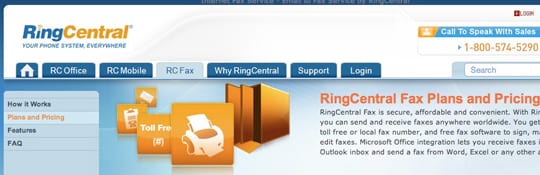
This site allows users to send 150 free faxes per month. You are able to receive faxes from any type of fax machine when you go through this service. It is PC and Mac compatible. A desktop call controller makes it easy to manage all of your faxes.

6. Nextiva Fax


For those who plan on sending a high volume of faxes, NextivaFax offers 500 free faxes per month making it ideal for small business use. They offer many features making customization very easy too. If you happen to exceed the free fax limit, the cost for sending additional faxes is very low compared to other services.

7. TrustFax


A fill-in-the-blank form makes sending faxes from this site quick and simple. A file cabinet will store your faxes and a fax tracker will keep you updated on the status of sent faxes. They offer 24/7 customer service should you need any assistance.

8. FaxFreedom


This service is great for sending, receiving, printing, and archiving faxes. A unique feature of this service is that they offer 800 numbers and vanity numbers or you can even use your own 800 or 888 number when you send faxes through them.

9. Send2Fax


With this service you can send documents as well as images via fax. It supports TIF, JPG, GIF, and PNG files for a simple way to send pictures. It is very user friendly and allows 100 free faxes per month.
10. FaxZero

»»  Read more

10 Best And Free Online Video Editing Software

All in One Blog

Free online Video Editing Tools work within your browser to cut and edit videos without having too much knowledge of video editing. They are really very easy to learn and simple to use.
The main advantage of online video editing tools are they don’t require any plugins or download to use them. Some of these services would allow you to download your finished edited video while some of them allow you to share your finished video in various social sites.

1. YouTube Remixer

youtube-remixer

2. PhotoBucket

photobucket

3. Kaltura

kaltura

4. Editor One

editorone

5. MotionBox

motionbox

6. JayCut

jaycut-editor

7. One True Media

one-true-media

8. Movie Masher

movie-masher

9. Stash Space

stash-space

10. VideoEgg

video-egg
»»  Read more

Download Bumptop software totally free!!!

June 25, 2010 All in One Blog

BumpTop is a desktop environment supporting normal behavior of a real-world desk. It is aimed at stylus interaction, making it more suitable for tablet PCs and palmtops. It was created at the University of Toronto as Anand Agarawala's Masters Thesis. Anand Agarawala also gave a presentation at the TED conference about his idea. The 1.0 version was released on April 8, 2009, along with a fully featured pro version that is a paid upgrade. On April 30, 2010 the author announced that BumpTop was being discontinued and that they were taking the software "...in an exciting new direction..."  Two days later on May 2, it was announced that the company had been acquired by Google.


In BumpTop, documents are described by three-dimensional boxes lying on a virtual desk. The user can position the boxes on the desk using the stylus or mouse. Extensive use of physics effects like bumping and tossing is applied to documents when they interact, for a more realistic experience. Boxes can be stacked with well-defined gestures. Multiple selection is performed by means of a LassoMenu, which fluidly combines into a single stroke the act of lasso selection and action invocation via pie menus. BumpTop currently supports Windows XP/Vista/7, and a version for Mac OS X/Linux was released into private beta on Jan. 18th, 2010. The Mac edition eschews the pie menu in favor of a more normal selection menu

»»  Read more

How To Set Up Your Favorite Video As Desktop Wallpaper

All in One Blog

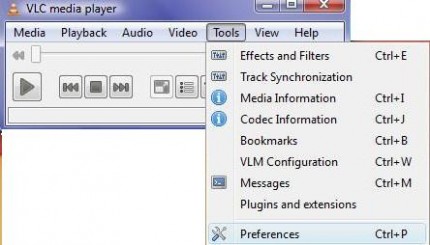
Firstly, you have to install free VLC Media Player to perform this simple trick for setting up any video for your desktop wallpaper. Now open VLC and select “preferences” from “tools” option.
Tools > Preferences
Under “preferences” windows, click “video” option and select “DirectX video output”. Click on save before existing VLC.
Video > Output > DirectX video output
Now, run any video file in VLC media player and right click on the screen. Click on “video” option and click on “DirextX wallpaper”. You are done setting up video wallpaper on your desktop.
Video < DirectX Wallpaper
If you are using Windows Aero theme, you will receive a warning and your current theme will automatically change into Windows Basic theme.
Warning message
Enjoy your video wallpaper on your desktop and when you want to switch back to your previous settings, click on “video” and close out “DirectX wallpaper”.
Dektop Video Wallpaper
This might not be a productive but surely be a cool trick to impress your friends or to get rid of your old boring wallpapers.
»»  Read more

Top 5 Sites To Make National And International Phone Calls For Free

All in One Blog

When we talk about making phone calls from our PC through internet, we think of  instant messaging services like Yahoo Messenger and Google Talk which provides PC-to-PC voice calls.

1) MediaRing Talk : MediaRing Talk for Mobile lets you enjoy free mobile-to-mobile calls to and from anywhere in the world. Paying no roaming charges, you can stay in touch with friends, family or even business associates while on the move and not worry about incurring expensive IDD charges. Free calls from PC to phones can be made to 8 global destinations which are USA, UK, Canada, China, Singapore, Australia, Taiwan & Hong Kong.

2) Globe 7 : Globe7 is a tiny application integrated with Soft Phone, IM, Videos, Games, News and many more opt-in widgets for your complete entertainment, information and communication. WIth Globe 7, you can not only just make free calls but also watch free videos, play free games, free live, free live radio, send sms, upload and share files etc. The best part is this software is available for Windows, Mac, Linux and mobile users.

3 ) Goober YouCall : Register yourself with a free account, no download required. Enter your phone no., enter your destination no and your call is made. The only limitation is that duration of call according to the destination you call. Your account is pre-filled with some credits while you register yourself which you can use to make free calls.

4) iCall : iCall uses Voice Over IP (VoIP) technology which utilizes your existing Internet connection (cable, DSL, wireless, or dial-up) and your PC to plug you directly in to the regular telephone network. iCall gives you option to download the software for PC or you can make call directly from the browser. iCall is also supported in iPhone, iPhone 3G and iPod touch.It only provides free calls to US and Canada when you make calls from the browser and the duration of each free call is 5 minutes.

5) Jaxtr : First sign up for a free account. Enter your number and then the destination number. Jaxtr will give you a local number, dial it from your phone. When it prompts, make a call to your friend’s number.
»»  Read more

Top 5 Sites To Make National And International Phone Calls For Free

All in One Blog

When we talk about making phone calls from our PC through internet, we think of  instant messaging services like Yahoo Messenger and Google Talk which provides PC-to-PC voice calls.


1) Evaphone : EvaPhone provides Internet telephone calls for free. Their website offers free VoIP call solutions which lets you make PC-to-phone free international calls.
The only limitation with this service is that duration of the free call varies in which country the call is made and the line provider.

2) FreeCall : It is a application which can be downloaded in your PC to make free calls to more than 50 destinations. You can make 300 minutes of free calls in a week to pre-defined free destinations. Unused minutes cannot be forwarded to next week. Please check this link to know destinations in which free calls are provided.

3) Calleasy : This website offers you free calls to the countries with rates below than 5 eurocents/minute. You can make calls through your PC as well as with your mobile. You can check this link to check the rates for every destination listed and start making free calls.

4) PokeTalk : PokeTalk offers free international calling to over 50+ countries worldwide. You don’t need any headphones, adapters, no download required. You can make up to nearly 50 calls per month, with a limit of 10 minutes per call. You can check this link which will lead you the free destinations available. Desktop Gadget is also available  for Windows and Mac users and you can also make calls from website.
5) Flash2Voip : Flash2Voip allows you to make free international calls to over 30 countries right from your browser.  No need to download and install anything but simply register on the site and you are good to go.
»»  Read more

Top 10 Photo Editing Software For Free Download

All in One Blog

1) Paint.net


2) Irfan View

4) Visual Box

5) Image Editing Tool

6) 5Dfly

7) Acorn

8 ) Gimp

9) Pixia

10) Photoscape

I hope every body will be satisfied with this list even designers as image/picture editing is thier most common job. And do share your best photo editingsoftware with our readers in the comments section below.
»»  Read more

Free iSkysoft Video Converter for Windows + Serial Code

June 18, 2010 All in One Blog

iSkysoft Video Converter is an excellent Video Converter software which can convert all popular video files from one format to another on Windows with great output quality and high conversion speed. It lets you easily convert between all sorts of video files such as AVI to MPEG, WMV to MPEG, WMV to MP4, Xvid, H.264, MKV, etc. which can be playback on almost all popular portable players including iPod, iPhone 4, iPhone 3GS, PSP, Zune, Zune HD, etc. Audio extraction and conversion is also supported by iSkysoft Video Converter. Besides, this Video Converter software offers you series video editing functions including crop, trim, set the brightness, saturation, etc.


Software Download

Serial Code


»»  Read more

30 Best Websites To Download Free EBooks

June 10, 2010 All in One Blog

»»  Read more

Digital Blog ( ডিজিটাল ব্লগ )

Digital Blog on Facebook
Button BEGIN --> Bookmark and Share